 CreativeDynamics Documentation (Version 0.9.8.1)
Example Application: Advanced Analysis - Quantifying Impact Using Library Outputs
Introduction: Building on Library Outputs for Domain-Specific Metrics
The library provides core functionalities for time-series analysis: identifying change points and classifying trends in data segments (see Methodology). These outputs serve as foundational elements for domain-specific calculations.
This document presents the framework for calculating two non-additive impact measures in performance marketing, building on temporal segmentation and trend analysis:
actual_overspend_gbp (financial): quantifies overspend due to elevated CPC vs benchmark
engagement_gap_clicks (operational): quantifies lost clicks vs benchmark
These metrics are reported separately and must not be added together. A GBP reference value for engagement_gap_clicks may be shown but is clearly labelled as a reference, not a financial loss.
Statistical Fallacies of Naive Impact Models
Superficially intuitive approaches to impact calculation often prove inadequate when confronted with non-stationary, complex real-world advertising performance data. Common naive models:
Single Fatigue Point Model
Presupposes a single point in time, t_fatigue, after which performance irreversibly degrades. Impact calculated relative to pre-fatigue baseline: sum_{t > t_fatigue} [(CPC_t - CPC_baseline) * Clicks_t].
Critique: Real-world performance rarely exhibits single, monotonic decline. Time series often contain multiple change points, recovery periods, and varying rates of change. Assuming single t_fatigue ignores this complexity and can lead to significant under- or over-estimation of true impact.
Arbitrary Benchmark Model
Compares observed CPC against external or arbitrarily chosen benchmark.
Critique: Lacks context-specificity. Fails to account for unique performance potential and lifecycle dynamics of individual creative asset.
Implemented Framework: Benchmarking Against Sustained Optimal Performance
The library implements an impact calculation framework that quantifies:
actual_overspend_gbp (financial inefficiency) during periods where CPC exceeds the benchmark
engagement_gap_clicks (operational impact) during periods where CTR falls below the benchmark These are benchmarked against the creative’s own optimal performance period and are reported separately (not added together).
Financial Impact: Actual Overspend (GBP)
Step 1: Define the Benchmark CPC (CPC_benchmark)
Let P = {S0, S1, …, Sn} be the set of temporal segments identified by change point analysis. Identify segments with stable or improving trends: P_opt = {Si in P | Trend(Si) in {‘Stable’, ‘Improving’}}. Select longest segment Si* in P_opt and compute CPC_benchmark as average CPC in that segment.
Step 2: Identify Declining Periods (T_decline)
Define T_decline as all time points within segments classified as ‘Declining’.
Step 3: Calculate Point-in-Time Actual Overspend (actual_overspend_gbp_t)
For each t in T_decline: actual_overspend_gbp_t = max(0, CPC_t - CPC_benchmark) * Clicks_t.
Step 4: Calculate Total Actual Overspend (actual_overspend_gbp)
actual_overspend_gbp = sum_{t in T_decline} actual_overspend_gbp_t.
Operational Impact: Engagement Gap (Clicks)
Step 1: Define the Benchmark CTR (CTR_benchmark)
Using same segmentation approach as for CPC, identify longest stable or improving segment and compute CTR_benchmark as average CTR in that segment.
Step 2: Identify Declining Periods (T_decline)
Define T_decline as all time points within segments classified as ‘Declining’.
Step 3: Calculate Point-in-Time Engagement Gap (engagement_gap_clicks_t)
For each t in T_decline: engagement_gap_clicks_t = max(0, CTR_benchmark - CTR_t) * Impressions_t.
Step 4: Calculate Total Engagement Gap (engagement_gap_clicks)
engagement_gap_clicks = sum_{t in T_decline} engagement_gap_clicks_t.
Optionally, a GBP reference value can be derived as:
engagement_gap_gbp_reference = engagement_gap_clicks * CPC_benchmark
Data Validation and Normalisation
Prior to impact calculations, the library performs critical data validation and normalisation steps:
CTR Normalisation
Automatically detects and normalises CTR values stored as percentages rather than fractions. For example, if CTR values are stored as 0.37 (representing 37%) instead of 0.0037 (representing 0.37%), the system normalises these values by dividing by 100. Prevents impossibly high CTR benchmarks and ensures accurate impact calculations.
Visualisation and Interpretation
The library generates sophisticated visualisations to help interpret impact analysis results. This section explains how to read and interpret these plots.
Enhanced Individual Metric Analysis
Generates enhanced two-panel plots for each metric (CPC or CTR) with impact analysis overlays.
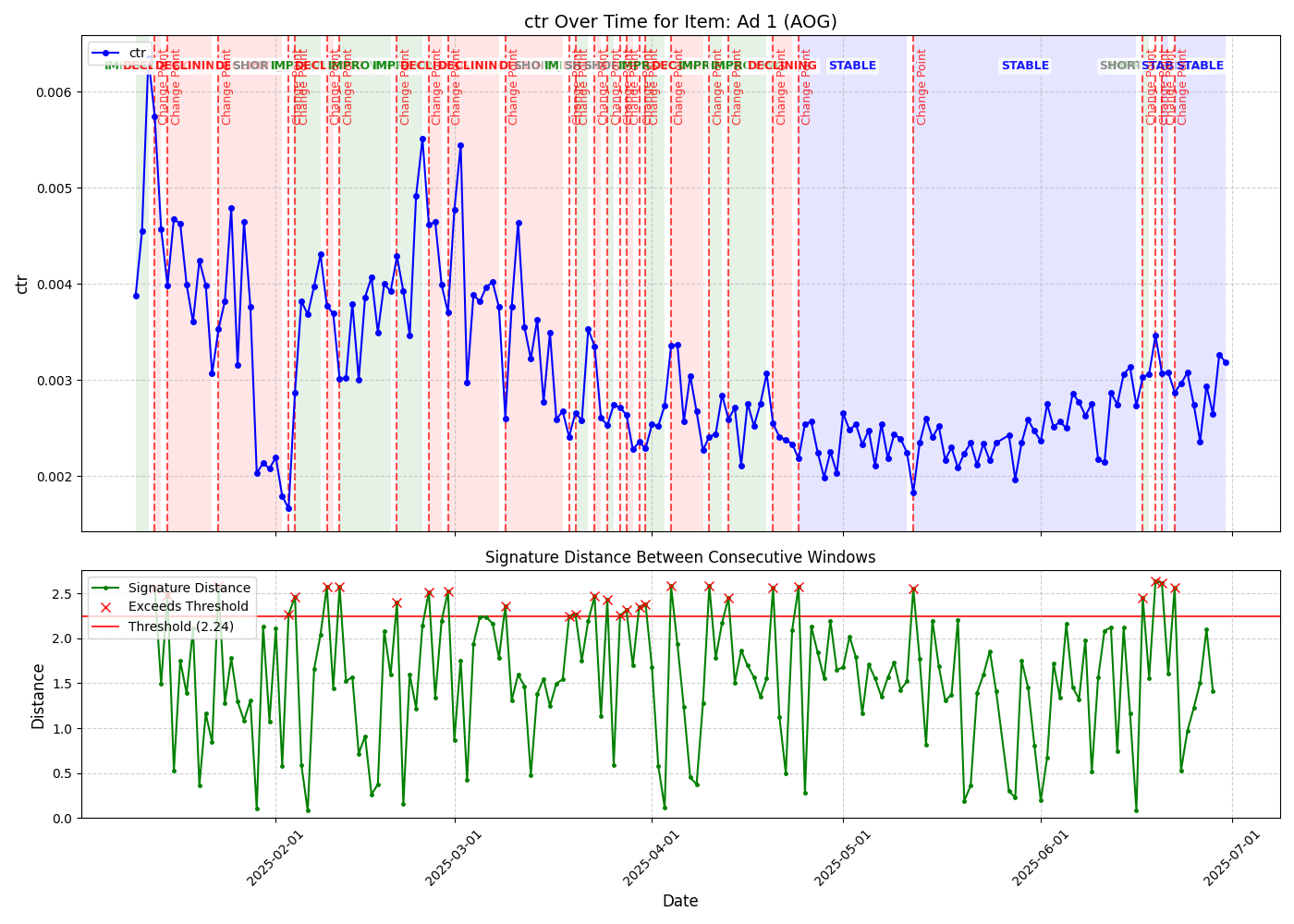
Top Panel: Time Series with Impact Context
Displays primary metric over time with key analytical overlays:
Time Series Line (Blue)
Shows the actual CTR values over the analysis period
Connected points indicate daily performance measurements
Fluctuations reveal natural variation and trend changes
Benchmark Line (Green Dashed)
Horizontal line representing the calculated benchmark value (2.60% in this example)
Derived from the period of optimal stable performance
Serves as the reference point for impact calculations
Benchmark Period Highlighting (Light Blue Shaded Area)
Indicates time period used to establish benchmark
Typically represents longest stable or improving performance segment
In this example, covers first 7 days when CTR was consistently high
Segment Trend Labels
Text annotations showing identified trend classifications
“STABLE” indicates periods of consistent performance
“DECLINING” marks periods where performance deteriorates
Based on signature-based change point detection
Underperformance Areas (Red Shaded Regions)
Highlight periods where actual performance falls below benchmark
Only shown for declining periods after benchmark period ends
Area size reflects magnitude of impact (e.g., engagement gap)
Vertical red lines mark boundaries of impact periods
Change Points (Red Vertical Lines)
Mark significant pattern changes detected by signature analysis
Indicate transitions between different performance phases
Based on mathematical signature distance calculations
Bottom Panel: Signature Distance Analysis
Shows sophisticated mathematical analysis underlying change point detection:
Signature Distance Line (Green with Dots)
Each point represents mathematical “distance” between consecutive time windows
Higher values indicate greater changes in underlying pattern
Based on rough path theory and signature calculations
Detection Threshold (Red Horizontal Line)
Threshold value (1.708 in this example) for anomaly detection
When signature distances exceed this threshold, significant changes are flagged
Automatically calculated based on data characteristics
Anomaly Markers (Red X)
Mark time points where signature distances exceeded threshold
Correspond to change points shown in top panel
Indicate statistically significant pattern shifts
Impact Analysis Dashboard
For detailed analysis, generates a four-panel dashboard summarising operational (clicks) and financial (GBP) impact separately.
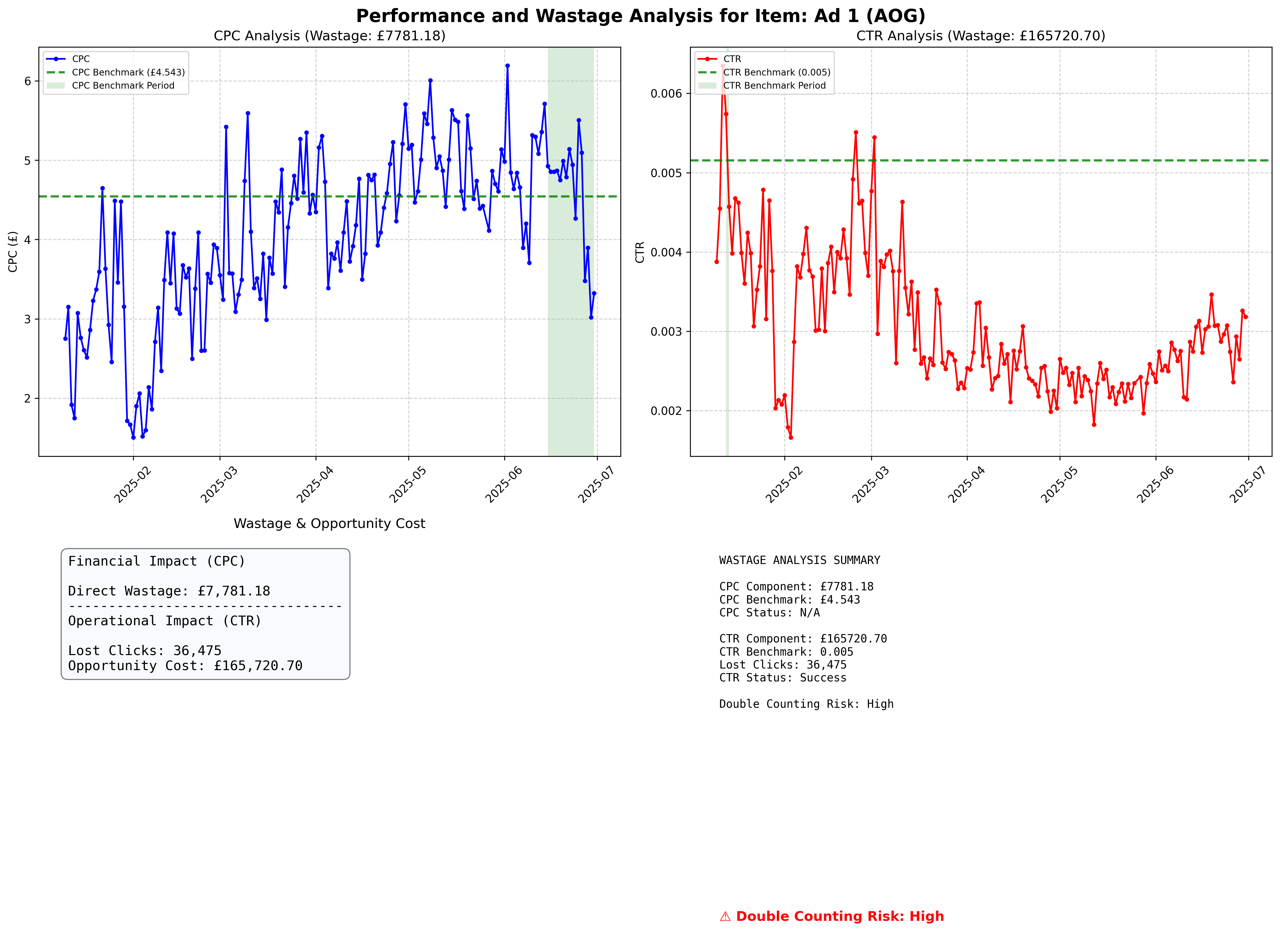
Panel 1: CPC Analysis (Top Left)
Mirrors individual CPC analysis with:
CPC time series with benchmark line and impact highlighting
Segment trend classifications
Change point markers
Underperformance area visualisation
Panel 2: CTR Analysis (Top Right)
Mirrors individual CTR analysis with:
CTR time series with benchmark line and impact highlighting
Segment trend classifications
Change point markers
Underperformance area visualisation
Panel 3: Impact Indicators (Bottom Left)
Primary and Reference Indicators
engagement_gap_clicks (primary): Lost clicks relative to benchmark (operational)
actual_overspend_gbp (secondary): Actual overspend relative to benchmark (financial)
Do not add or combine these metrics; they are conceptually distinct
Panel 4: Summary and Risk Assessment (Bottom Right)
Detailed Text Summary Including:
Impact Metrics
engagement_gap_clicks (primary)
actual_overspend_gbp (secondary, clearly labelled as reference value for GBP when applicable)
Lost clicks due to CTR underperformance (as engagement gap)
Benchmark Information
CPC and CTR benchmark values with calculation periods
Provides context for impact calculations
Calculation Status
Indicates whether impact calculations were successful
“Success” confirms reliable benchmark establishment
“Insufficient Data” or “No Declining Periods” indicate limitations
Correlation Risk Indicator
Colour-coded severity levels:
Low Risk (Green): Weak or positive correlation (r > -0.2)
Medium Risk (Orange): Moderate negative correlation (-0.5 < r < -0.2)
High Risk (Red): Strong negative correlation (r < -0.5)
Unknown Risk (Grey): Insufficient data for correlation analysis
Metrics are not combined; interpret engagement_gap_clicks and actual_overspend_gbp separately regardless of risk level
Interpretation Guidelines
Understanding Impact Magnitude
Significant Impact Indicators:
Large red shaded areas in time series plots
Substantial gaps between actual performance and benchmark lines
Large engagement_gap_clicks and/or notable actual_overspend_gbp magnitudes
Minimal Impact Indicators:
Small or absent red shaded areas
Performance lines close to benchmark levels
Low engagement_gap_clicks and minimal actual_overspend_gbp in the summary panel
Correlation Risk Considerations
High Risk Scenarios:
Strong negative correlation between CPC and CTR (r < -0.5)
When CTR declines, CPC increases proportionally
Do not compute any combined total; interpret engagement_gap_clicks and actual_overspend_gbp separately
Low Risk Scenarios:
Weak or positive correlation between CPC and CTR (r > -0.3)
Independent variation in both metrics
Use metrics independently; do not add
Actionable Insights
Performance Optimisation:
Focus intervention efforts on periods with large underperformance areas
Address the metric contributing most to operational or financial impact
Consider creative refresh at detected change points
Budget Planning:
Use actual_overspend_gbp for financial inefficiency assessment
Use engagement_gap_clicks for operational impact assessment
Do not compute or use any combined total
Campaign Management:
Monitor signature distances for early warning of performance changes
Set alerts when distances approach detection thresholds
Use benchmark periods as performance targets for optimisation
Conclusion
This framework provides a data-driven measure of operational and financial impact using temporal segmentation from signature analysis. The detailed visualisation suite enables both technical analysis and business decision-making by clearly presenting complex mathematical insights in accessible format without conflating distinct concepts.